You open Gmail and it looks the way it did before Notion Mail: one long list, and labels that just sit there. The views that sorted your mail went dark on 22 September. If you're shopping for a Notion Mail alternative, our pick is CoPhrase. We should say up front that we make it, and CoPhrase publishes this blog. It's the closest match to what Notion Mail did. AI labels and Split Inbox tabs come from rules you write in plain words, and it's free with your own AI.
Five other options get a fair hearing too, each with its price and its catch. Near the end, a six-step guide shows how to move your rules across.
What happened to Notion Mail
Notion Mail launched in April 2025 as an AI inbox for Gmail. Notion announced the shutdown on 25 June 2026, and the inbox closed on 22 September on web, desktop and iOS. The last day to export was 21 September, and anything you hadn't saved was deleted after the shutdown.
A few things had to be saved by hand: drafts, scheduled emails, snippets and the instructions behind your auto-labels. Most of your mail never lived in Notion at all. It stayed in Gmail, and it's still there.
Notion's reason, as 9to5Mac reported it, was that "more than half of Notion Mail users manage emails without ever opening their inbox." So the company is "going all in on using agents to run your inbox." If you were in the other half, the half that liked opening it, that's cold comfort.
What made Notion Mail worth opening was a short list. Views split the inbox into topic folders, and Notion AI labeled each email into the matching view. Snippets saved the replies you kept retyping. It worked with Gmail and Google Workspace only, and the AI was free up to a monthly limit.
So what you lost was the rules, not the mail. Somewhere there may be a Notion page of auto-label prompts you meant to export. If you saved it, keep it open. If not, the rules are short enough to write again.
The short answer: best Notion Mail alternatives by need
- CoPhrase: best overall. AI labels and Split Inbox views come from plain-language rules, free with your own AI or a local model.
- Superhuman Mail: best if speed matters more than price and you're on Gmail or Outlook. Mail Starter is $30 a month.
- Shortwave: best for an AI-first Gmail with splits and bundles. Its AI filters start on the Business plan.
- Spark: best for many account types and a polished free plan.
- Inbox Zero: best for AI rules and labels on Gmail or Outlook, if you'll pay for the AI.
- Gmail with Gemini: best if you want nothing new and mostly need summaries.
One of these six is the inbox you already have, which is either reassuring or the whole problem.
What to look for in a Notion Mail replacement
A good replacement does the jobs Notion Mail did, at a price you'll keep paying. Six things decide it.
- AI labels from rules you write in plain words. This was the heart of Notion Mail: you described a kind of email, and AI filed it.
- Views or a split inbox. Labels only help when they turn into places to read, like tabs or folders. A label nobody looks at is just a sticker.
- Snippets or templates. The replies you send every week, saved once.
- Price, and whether the free plan includes AI. Notion Mail's AI was free up to a limit, so any bill is a new one.
- Which accounts it takes. Notion Mail took Gmail only, and Outlook and iCloud users were left out. IMAP, the standard way a mail app reads a mail server, is what lets an app take nearly any address.
- Where your mail and the AI run. Some apps keep mail on your computer, and some keep it on their servers. Some let you choose the AI; many choose for you. Our privacy and security page shows how CoPhrase handles each.
The last one is new. Notion Mail never asked which AI should read your mail: Notion chose Notion AI, and you didn't.
Now you get to choose. One option is your own key. An API key is the code an AI company such as OpenAI or Anthropic gives you, so an app can use your account. Another is a local model, which runs on your own computer through a tool like Ollama, so the text never leaves it. The third is leaving AI off and filing by hand, which works fine until Monday morning.
Notion Mail alternatives compared
The matrix puts Notion Mail in the top row as the baseline, so you can see what each app keeps and what it drops.
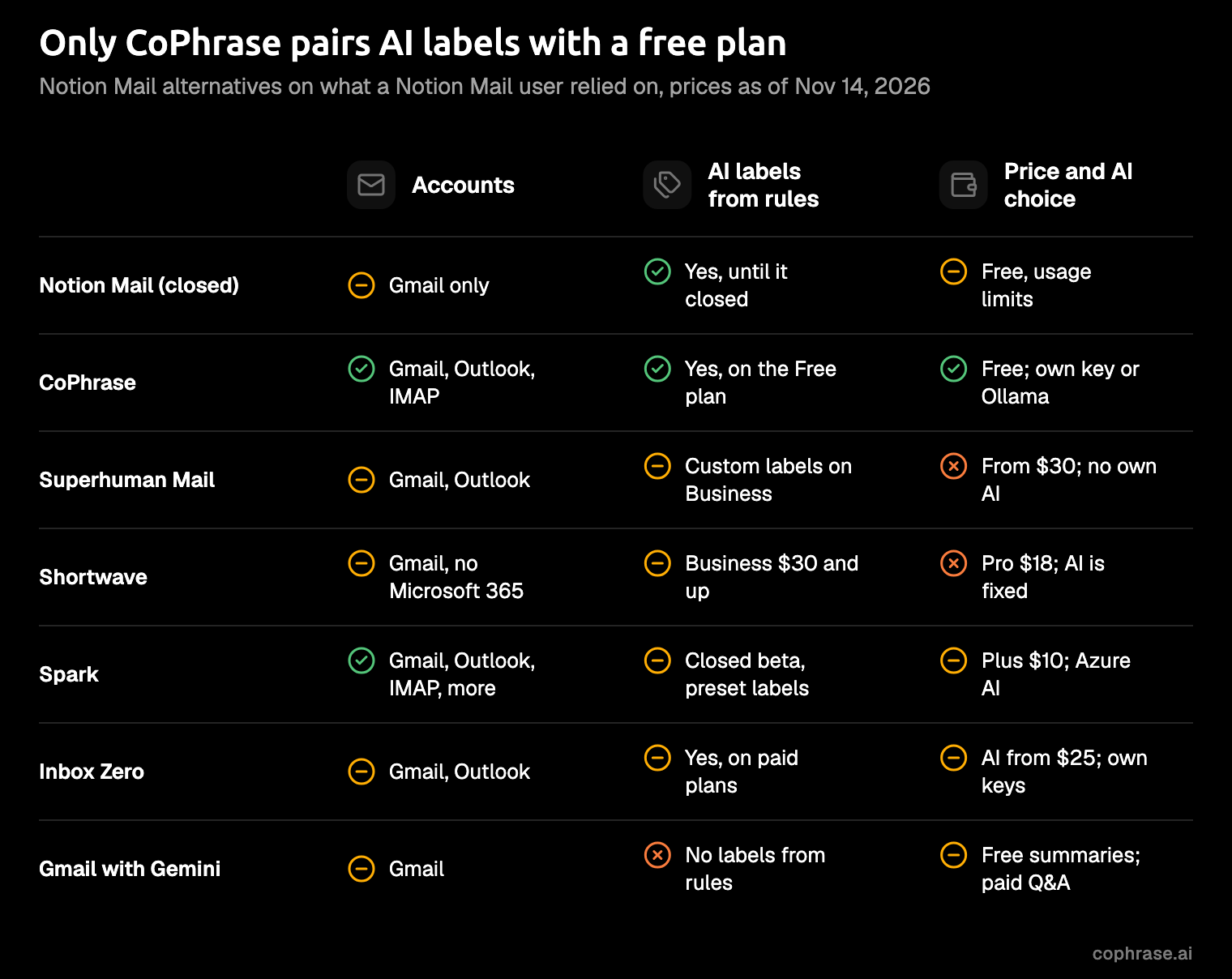
Three readings matter most if you're coming from Notion Mail.
First, of the apps in this post, CoPhrase is the only one whose free plan sorts mail with AI labels from your own rules. Superhuman's free suite plan leaves Mail out, and its Custom Auto Labels are on the Business plan. Shortwave's AI filters start at Business too. Spark's Auto-Labels are a closed beta with preset labels, not labels from your rules, and Inbox Zero's AI needs a paid plan.
Second, choosing your AI is rare. Superhuman, Shortwave and Spark's built-in AI all pick the model for you. Inbox Zero takes your own key on its hosted service and adds Ollama when you host it yourself. CoPhrase takes your own key or a local model right in the desktop app, with no server to run.
Third, accounts. Spark and CoPhrase both take IMAP alongside Gmail and Outlook. Superhuman Mail and Inbox Zero stop at Gmail and Outlook, and Shortwave doesn't support Microsoft 365.
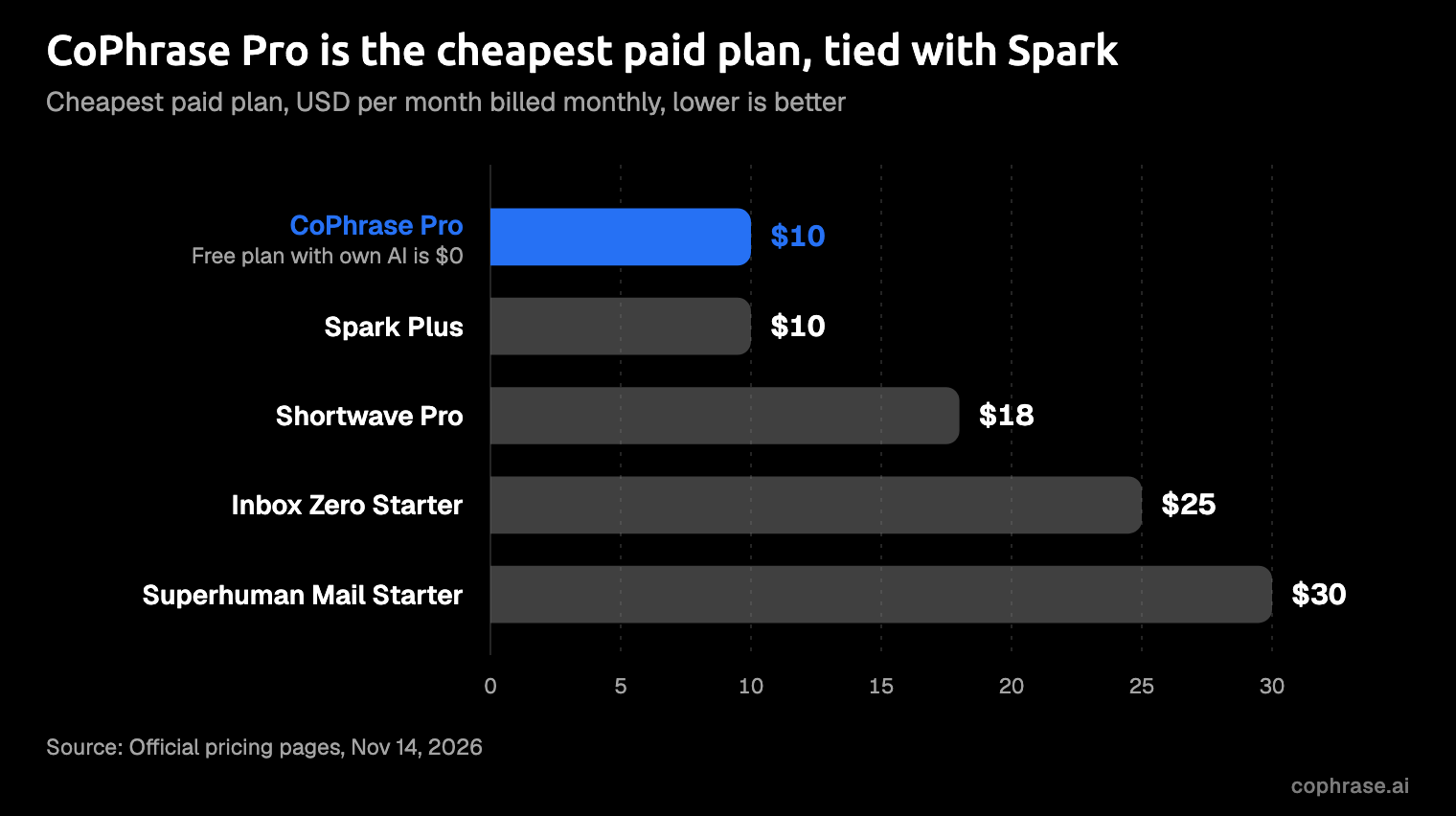
On paid plans, CoPhrase Pro and Spark Plus tie at $10 a month, and Superhuman Mail Starter costs three times that. The more useful figure for someone leaving Notion Mail sits under the bars: CoPhrase Free with your own AI costs nothing. Free is a hard price to beat, and Notion Mail users got used to it.
Prices are as of November 2026 and billed monthly; each entry below links the app's own pricing page.
The 6 best Notion Mail alternatives
Every app here has a catch, ours included.
1. CoPhrase: best overall, free with your own AI
A reminder before the case: we make CoPhrase, and this is our blog. Everything here is on our site to check.
CoPhrase is an email client with mail, calendar and AI in one calm, keyboard-first app. It works with Gmail, Outlook and IMAP accounts, with Google Calendar and Outlook Calendar beside the inbox.
This is how Notion Mail's Views come back. You write a rule in plain words, such as "newsletters I actually read," and AI labels the mail that fits. Then you make that label a Split Inbox tab. The newsletters you don't actually read can get a tab of their own, which you're free to never open. Templates do what snippets did, and Home, Screener, snooze and send later are there as well.
AI is off until you turn it on in Settings → AI. There you choose: your own OpenAI, Anthropic or OpenRouter key, any OpenAI-compatible endpoint, Ollama on your own computer, or CoPhrase Cloud AI on Pro. With Ollama, no text leaves the computer. With your own key, text goes from the device straight to that provider. In the desktop app's direct mode, mail stays on the computer too and CoPhrase talks straight to Google, while Pro's hosted sync is encrypted in transit and at rest.
AI can't quietly rearrange the inbox either. Actions that change or send mail wait for your approval unless you allow them, and Activity (g a) shows every AI action and why. The AI and providers guide lists every option.
The Free plan covers what Notion Mail did for you: 2 mailboxes, your own AI and Split Inbox. Pro is $10 a seat a month for 10 mailboxes, full history and Cloud AI credits.
There are apps for Mac and Windows, plus web, iPhone and Android. The core is open source under AGPL-3.0, and you can run your own server with Docker.
The catch: CoPhrase is a younger product, with a smaller community than the older names on this list. The code is open to read and the Free plan costs nothing to try. Your mail stays in Gmail, so leaving is a sign-out. There's no Notion Mail importer either, and you won't need one; the move section shows why.
Best for: Notion Mail users who want the sorting back, free, with a say in which AI does it. It's the closest thing to Notion Mail's Views, without handing your mail to an AI you didn't pick.
2. Superhuman Mail
Superhuman Mail is the premium option here, sold on speed. It has apps for Mac, Windows, iOS and Android, and integrations with HubSpot, Salesforce and Pipedrive.
It takes Gmail and Outlook accounts but not IMAP, and there's no way to bring your own AI. Superhuman's help page puts Mail Starter at $30 a month or $300 a year. For sorting, Custom Auto Labels come with the Business plan at $40 a month.
Its own page for Notion Mail users says there's "nothing to migrate." That's true of the mail, which is in Gmail anyway. It's less true of the rules and snippets, which the page doesn't cover.
The catch: the price.
Best for: speed-first Gmail or Outlook users who'll pay for it. Paying for speed is a fair choice; just make it on purpose.
3. Shortwave
Shortwave is an AI-first email app built around Gmail. Its Splits divide the inbox into tabs by importance, sender, label or a custom search, and Bundles group newsletters and promotions together. Splits are a near cousin of Notion Mail's Views.
For a Notion Mail user, the question is where the auto-labels sit, and the answer is a few plans up. Shortwave calls them AI filters, and they start on the Business plan: $30 a seat a month for 3 filters.
Below that sit a Free plan, with 90 days of search history and basic Splits, and Pro at $18 a month. Neither includes AI filters or snippets.
The AI model is fixed by plan, and your data is stored in Google Cloud. OpenAI and Anthropic handle some of that data for Shortwave, and Microsoft 365 accounts aren't supported.
The catch: the auto-labels Notion Mail had start at Business, not Pro.
Best for: heavy Gmail users who want splits and bundles, and who'll pay for Business to get AI filters.
4. Spark
Spark is a polished everyday email app with the longest account list here: Gmail, iCloud, Outlook, Exchange, Yahoo and IMAP. It runs on Mac, Windows, iPhone, iPad and Android.
Spark's own page for Notion Mail users maps the features across: Templates for snippets, Send Later for scheduled emails and Smart Folders for custom views. The free plan includes Smart Inbox, unlimited accounts and Calendar, plus a limited preview of +AI. Plus is $10 a month or $99 a year, and Pro is $20 a month or $199 a year.
The piece Notion Mail was known for is the one Spark is still testing. Its Auto-Labels are in a closed beta for a limited group, with seven preset labels such as To respond, FYI and Marketing, rather than labels from rules you write. The beta needs Spark Pro, the desktop app on Mac or Windows, and a personal Gmail account. Spark's Notion Mail page also suggests Spark CLI as a workaround, a tool that connects Claude, Codex and other agents to the inbox. That's handy if you already run your own agent.
Spark's +AI runs on Azure OpenAI and is off by default. Azure doesn't train on the data and keeps it for up to 30 days, and Spark doesn't store it.
The catch: no labels from your own rules, and the built-in AI isn't your choice.
Best for: mixed accounts on a budget, and anyone who wants a polished everyday app more than AI sorting.
5. Inbox Zero
Inbox Zero is an open-source AI email assistant for Gmail and Outlook, built around AI labels and rules. The code is AGPL-3.0 with extra terms: making money from it needs permission, and an organization with 5 or more business users needs an enterprise license.
The email app is free on web, desktop and iPhone, but the AI that sorts it needs a paid plan. Starter is $25 a month, or $20 a month billed yearly, with 2 accounts per user.
On the hosted service, you can bring your own key for 8 providers. Ollama and other OpenAI-compatible models come in only when you host it yourself, so keeping the AI at home means running the server too.
The catch: the free part leaves out the AI, and the AI was the part you came for.
Best for: AI rules on Gmail or Outlook, if you're happy to pay for them.
6. Gmail with Gemini (stay put)
The no-move option is the inbox you're already in. Google's January 2026 announcement made AI Overview thread summaries, Help Me Write and Suggested Replies free, in English in the US. Asking your inbox questions, and Proofread, need a Google AI Pro or Ultra plan. AI Inbox was going to trusted testers first, and Google doesn't describe it as labeling.
None of it sorts mail into views from rules you write. Your old Gmail filters keep doing exactly what they did before, no more and no less.
The catch: it helps you read faster, but it won't sort for you.
Best for: anyone who wants nothing new and mostly needs summaries.
How to move from Notion Mail to CoPhrase
Whichever app you pick, the move is lighter than it sounds, because what you're really moving is the setup: rules, views and snippets. In CoPhrase, that takes six short steps.
- Download CoPhrase and connect Gmail with Google sign-in. Google handles the sign-in, so CoPhrase never sees your password. The getting started guide walks through it.
- Leave your Gmail labels and filters alone. They stay in your Gmail account and keep working.
- Turn on AI in Settings → AI and pick your own key, Ollama for a local model, or Cloud AI on Pro.
- Paste each auto-label instruction you saved as an AI label rule, then make the labels you read into Split Inbox tabs.
- Recreate your snippets as templates.
- Turn on the Gmail shortcut preset in Settings → Shortcuts, and press
⌘Kfor the command palette whenever a key slips your mind. The keyboard shortcuts page has the full list.
If you didn't export before 21 September, write each rule again, one sentence at a time. For many inboxes a handful does the job: the people you always answer, the newsletters you read, the receipts you keep. Start there, and add a rule whenever something lands in the wrong tab.
The rules were the valuable part of Notion Mail, and it turns out they're a few sentences long.
FAQ
Can I still export my Notion Mail data?
No. The last day to save it was 21 September 2026, and anything unsaved was deleted after the shutdown.
Is there a free Notion Mail alternative with AI labels?
Yes. CoPhrase Free sorts mail with AI labels from rules you write in plain words, using your own AI key or a local model through Ollama. With your own key, that AI company bills you for usage; a local model runs on the computer instead.
Does my mail move when I switch?
No. It's still in Gmail, where Notion Mail left it, and CoPhrase connects to the same account; the move steps above cover the rest.
Get your sorting back
Notion Mail's best idea was simple: describe your mail, and the inbox sorts itself. The idea outlived the app. Download CoPhrase free for Mac or Windows, or see Pro.